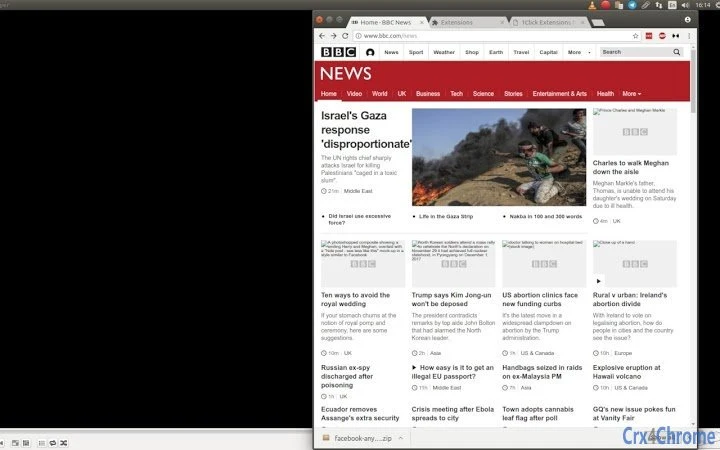

Redimensionnement sans effort d'une fenêtre en demi‑écran
Vue d'ensemble
The 1ce Half-Screen Resizer is a lightweight browser extension designed to streamline multitasking by automatically resizing the active browser window to half of the screen width. This tool is particularly useful for users who frequently work with two windows side by side, such as comparing documents, monitoring live data, or managing multiple tabs while referencing external content. The extension operates directly within the Chrome browser environment and is intended for everyday productivity enhancement.
Targeted at professionals, students, and remote workers, this tool supports efficient workspace organization without requiring complex setup. Its open-source nature ensures transparency, allowing users to verify code integrity and contributing developers to participate in its evolution. The developer, 1ce, emphasizes community-driven development and privacy-first principles, aligning with modern digital safety standards.
Real-world usage scenarios include research workflows, coding sessions with documentation open, video calls alongside note-taking, and content creation requiring simultaneous access to reference materials. The extension is designed for simplicity, focusing on a single core function: precise, one-click window resizing. It does not require installation beyond the browser extension store, making it accessible to users of all technical skill levels.
Fonctionnalités clés et capacités
- Redimensionnement en demi‑écran d’un clic – Click the extension icon to instantly resize the current browser window to exactly half the screen width. Ideal for side-by-side comparisons and efficient multitasking.
- Open‑Source Transparency – The source code is publicly available, allowing users to inspect, audit, and contribute improvements. This fosters trust and community collaboration.
- Privacy‑First Design – No data is collected or transmitted. All operations occur locally on the user’s device, ensuring complete privacy and security.
- Zero Permissions Required – The extension does not request access to browsing history, cookies, or other sensitive data, minimizing security risks.
- Multi‑Platform Browser Support – Works across Windows, Mac, and Linux systems through the Chrome browser, ensuring broad accessibility.
Users can leverage the tool during research sessions to view a webpage and a notes tab side by side. Developers can use it to keep code documentation open while writing. Students can compare lecture slides with textbook content. The simplicity of the feature ensures immediate usability with no learning curve.
Interface utilisateur, flux de travail & performances
The user interface is minimal and focused, consisting of a single icon within the browser toolbar. Clicking the icon triggers the resize function without additional prompts or settings. The workflow is streamlined: install → click → done. There are no configuration options, which enhances usability but limits customization.
Navigation is intuitive, relying on the familiar browser environment. The extension does not introduce new menus or complex controls. Performance is expected to be efficient due to its lightweight design—200 KB in size—and operation within the browser’s sandboxed environment. The developer did not specify resource usage details, but based on general software behavior, the extension consumes minimal CPU and RAM.
Stability is likely high, as the tool performs a single, well‑defined action without external dependencies. It does not interfere with other extensions or browser processes. No performance issues were reported in the provided information, and the absence of data collection reduces potential conflicts.
Compatibilité et exigences système
The extension is compatible with Windows, Mac, and Linux operating systems through the Chrome browser. The software version is 1.0.0, and the installation size is 200 KB. The developer did not provide additional system requirements, such as minimum RAM or processor specifications.
Compatibility information is limited to the supported platforms and browser. No specific hardware requirements were listed. The extension operates within the Chrome environment, so performance may vary slightly depending on the underlying OS and browser version. Users should ensure their Chrome browser is up to date for optimal functionality.
Avantages et inconvénients
Avantages
- Simple, one‑click functionality for efficient multitasking
- Open‑source with full transparency and community contribution potential
- Privacy‑focused with no data collection or external access
- Lightweight at only 200 KB in size
- Free to use with no hidden costs or subscriptions
Inconvénients
- Limited to Chrome browser only (no support for other browsers)
- No customization options for window positioning or size
- Only resizes to half‑screen width—no alternative sizing presets
- Requires Chrome extension store installation
- Minimal UI with no advanced settings or feedback indicators
Section FAQ
Cette extension est‑elle compatible avec tous les navigateurs ?
The extension is designed for Chrome and may not work on other browsers such as Firefox, Edge, or Safari. Users should check the official website for updates on cross‑browser support.
Mes données sont‑elles sécurisées lorsque j’utilise cette extension ?
Yes. The extension does not collect or transmit any user data. All operations occur locally on your device. The open‑source nature allows for public code review, enhancing trust and security.
À quelle fréquence les mises à jour sont‑elles publiées ?
Updates are released as needed by the development team. The project is maintained by the 1ce community, and users are encouraged to track changes via the official website.
Puis‑je contribuer au code source ?
Yes. Since the extension is open‑source, developers and contributors are welcome to review, improve, and submit changes to the code. Visit 1ce.org to learn how to participate.
Ai‑je besoin d’une connexion Internet pour utiliser cette extension ?
No. The extension functions entirely offline. It does not require internet access to resize windows or perform its core function.
Conclusion
The 1ce Half-Screen Resizer delivers a focused, reliable solution for users seeking to optimize their browser workspace. Its minimalist design, open‑source foundation, and strong privacy stance make it a trustworthy choice for professionals and casual users alike. While it lacks advanced customization, its single‑purpose efficiency stands out in a crowded productivity landscape.
For anyone who frequently works with multiple browser windows side by side, this tool offers a frictionless way to enhance workflow. Its lightweight footprint and zero permissions further reinforce its value. The developer’s commitment to transparency and community engagement adds long‑term credibility.
Download 1ce Half-Screen Resizer now to simplify your multitasking and reclaim screen real estate with confidence.







